
Local Chat
Talk to AI models right on your computer. You get streaming replies, full chat history, system prompts, a thinking mode toggle and per chat model choice. You can edit, copy, regenerate and delete any message.
Talk to local and cloud models, then let the AI run commands, read files, write files, edit, delete and handle real agentic work on your machine. Web search, reference files, images and an API server too. Free and open source.
v0.1.0 for Windows 10 and 11. Linux and macOS coming soon.
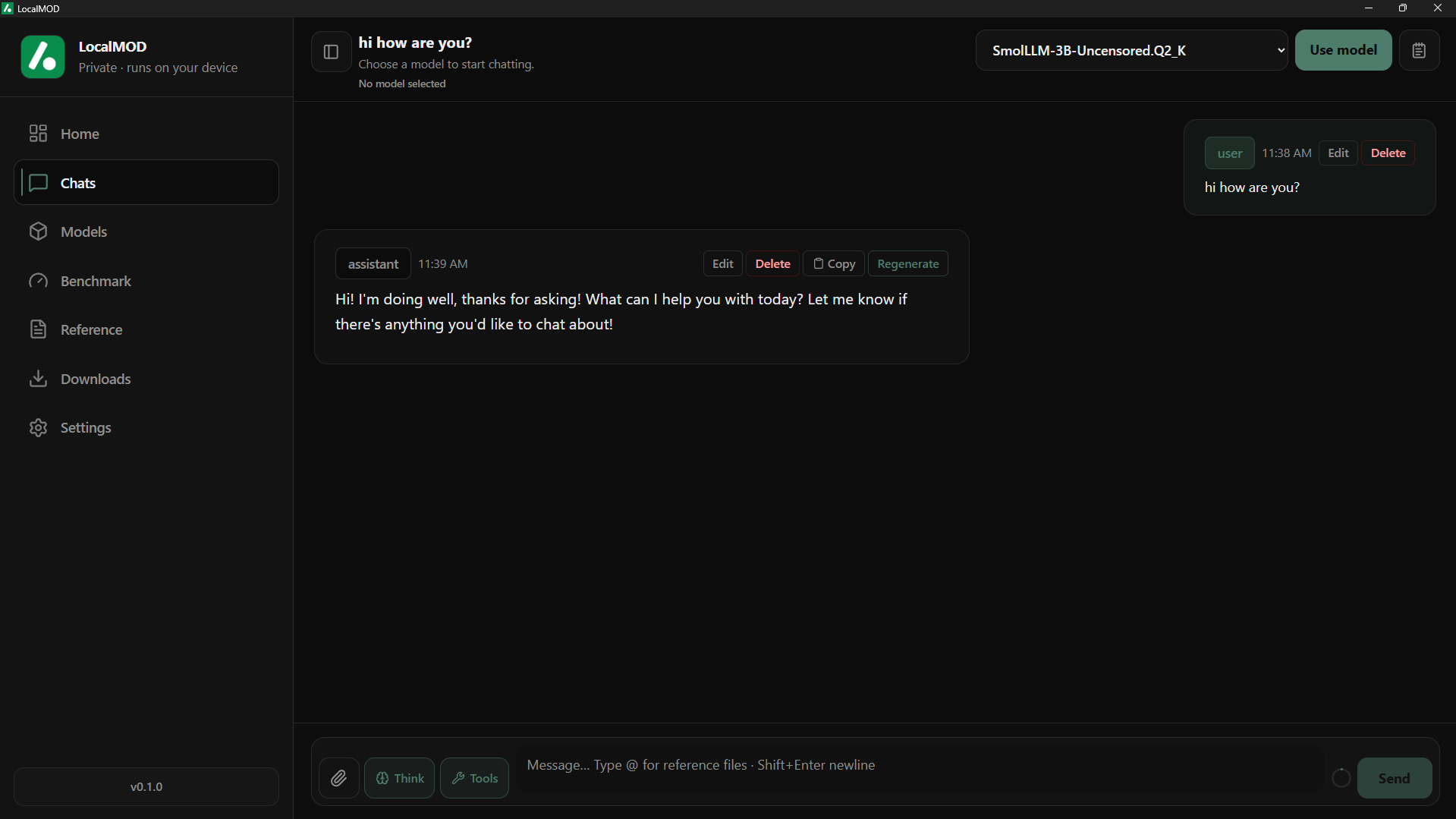
LocalMOD does a lot, but it never gets in your way. You install one app and you get a full local AI setup. Chat, agentic tasks, models, search, files, images and an API server all live in the same clean window. Here is what you can do with it.
Talk to AI models right on your computer. You get streaming replies, full chat history, system prompts, a thinking mode toggle and per chat model choice. You can edit, copy, regenerate and delete any message.
Turn on agent mode and the AI can do real work on your machine. Run terminal commands, read files, write files, edit them, delete them, create folders and more. Built for local developer workflows when you want agentic tasks, not just chat.
Import any GGUF model from a file on your disk, or pull one straight from a Hugging Face URL or model ID. LocalMOD loads it and runs it through the bundled llama.cpp runtime with no setup hell.
Add any cloud model you want. OpenAI, Anthropic, OpenRouter or your own custom provider. Paste your key and use big remote models in the same window as your local ones. Mix and match per chat.
Add files and text to a simple reference system. Drop in notes, docs, code snippets or research and let the AI use them as context while you chat. A clean local RAG setup with no extra services to run.
Let the AI search the web while you chat. Ask about fresh topics and get answers that pull in real results instead of stale model knowledge. It stays simple and stays in the same chat box.
Make images straight from chat using cloud models. Type what you want and get a picture back. This one is for cloud models only so your local runtime stays light and fast for text.
Flip one switch and LocalMOD runs an OpenAI compatible API server. Other apps can connect to your local models. It keeps running behind the scenes, even after you close the window.
Test one model or compare two side by side. LocalMOD checks speed, latency, basic reasoning, coding output and memory use so you know which model actually runs well on your machine.
Grab models with a real download manager. Long downloads can pause, resume, cancel and dismiss. You never have to babysit a giant file or restart from zero when something drops.
Set the context limit and tune the app the way you like. Change behavior, control how much the model remembers and keep things running the way that fits your computer and your work.
Local AI is powerful. The problem is that getting it to work is a mess for most people. You end up downloading random binaries, editing config by hand, running terminal commands and guessing which port a server is on. You manage model folders by yourself and you deal with crashes when a model fails to load. Then you have to figure out which model is fast, which is slow, which is good and which is just broken.
LocalMOD was made to fix that. You install one app. You add models. You chat with them. You test them. You turn on an API server for your other apps. That is the whole idea. One clean window that feels like a normal app, with deeper control sitting right there when you need it.
And because the whole thing is open source under the MIT license, you are never stuck. Developers can fork the project and build their own local AI runtime on top of it. Normal users get a tool that just works. Nobody pays a cent and nobody gets locked in.
LocalMOD is fast and light because it is built on tools that are made for the job. The desktop shell is Tauri. The brain is Rust. The interface is Svelte. The local model engine is llama.cpp. Here is the full set.
LocalMOD ships with an OpenAI compatible API server. Open the settings page, turn it on and your local models are ready for any app that speaks the OpenAI style. You can set a port, pick who is allowed to connect, copy the URL and switch API key auth on or off.
The server runs as its own binary, so it can keep working after you close the desktop window. Run it on a home machine, a LAN box or a VPS. Point your tools at it and you are done.
# list your models
GET  /v1/models

# send a chat message
POST /v1/chat/completions

{
  "model": "Your Model Name",
  "messages": [
    { "role": "user",
      "content": "Hello" }
  ],
  "stream": false
}There is no long setup and no terminal needed. The bundled runtime ships inside the installer, so you go from download to chatting in four simple steps.
Grab the Windows setup file from GitHub. It is one installer that carries the app and the bundled llama.cpp runtime inside it.
Run the setup and let it install. No separate llama.cpp download and no manual DLL hunting. Everything you need lands in one place.
Import a GGUF file, pull one from Hugging Face or add a cloud model. Pick the one you want and load it in a click.
Open a chat and talk to your model. Turn on web search, add reference files or flip on the API server whenever you like.
Yes. The whole app is free and fully open source under the MIT license. There is no paid tier, no trial and no account needed. You download it and you use everything.
Local GGUF chat runs on your computer with no internet. Cloud models, web search and image generation need a connection because they reach out to remote services.
No. The installer carries the llama.cpp runtime inside it. You install the app and local models just work. There is nothing extra to set up by hand.
Any GGUF model from a file or a Hugging Face URL or ID for local use. For cloud, you can add any provider you want, such as OpenAI, Anthropic, OpenRouter or your own custom endpoint.
Yes. Turn on the built in API server and any OpenAI compatible client can connect through the standard endpoints. It can keep running in the background after you close the window.
Windows 10 and Windows 11 right now. Linux and macOS support is planned. Since the code is open, anyone can help push those builds along.
One install. Local models, cloud models, web search, files, images and your own API server. Free, open and built to stay that way.